





Expandable Software workstation with integrated Hardware Controller
Drew Spence from Issue 03 Fall/Winter 2008
Standalone/VST/AU/RTAS
MAC OSX 10.4/WIN XP/Vista
I'm going to call Native Instruments KORE 2 a concept piece. I say this because it is hard to describe and any short summary of its functionality skips over another cool way to use it. I've had it for several months now and I still pause when someone asks me what it's about. Let's first cover what you GET and what you SEE then lastly figure out the many what you DOs.
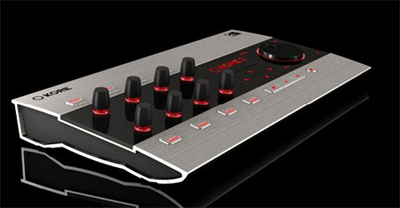
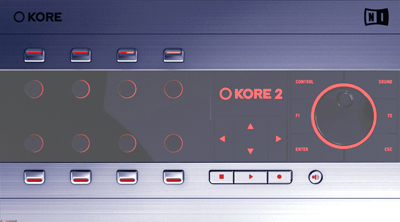
HardKore (what you get)
The unit is surprisingly heavy and well built. For all the live performance abilities it's aimed for- it needs to be and even has a laptop/notebook Kensington-style lock to ward off gear-grabbers at gigs. Round back are two user assignable footswitch ports- used for on/off signals in addition to the two Expression Pedal ports following right after (which everyone confuses for audio outs). Next to the USB interface is a MIDI In/out which allows for additional controllers. You can't use the controller without the KORE software engaged, but it has a MIDI In and OUT so you are not losing a port in practice.

The Controller knobs are touch-sensitive endless rotaries whose backlit Selection Rings glow more intently as the knobs are twisted. Above and below are the Controller Buttons which can be used in gate or toggle mode and will most likely be used by you to store a Sound Variation's settings (a snapshot of the KoreSound's Control Page settings). Below the display screen are the arrows which navigate the different frames of the KORE software edit screen. On the very bottom are the Transport controls. The huge Scrollwheel mirrors the up and down arrows for quick navigation. The Control Button brings up the Control Pages (what buttons/knobs do what) for the component in focus while the Sound Button switches to Sound Mode for navigating the Sound Matrix and also for morphing (gradually transforming) between Sound Variations. F1 is context sensitive and F2 opens the browser and hardware settings. The small speaker icon is a pre-listen or audition button.
SoftKore (What you see)
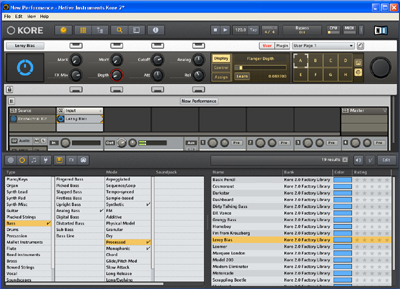 KORE has two modes of operation Standalone and Plug-in. Plug-in Mode has three additional options: standard VSTi, virtual FX rack and Multi-out with 16 stereo outputs. Like most VSTs with dual modes, expect more direct menu options when in standalone and more of the optional settings being controlled by the host sequencer when loaded as a plug-in.
 Once opened as a New Performance the screen is divided in to four tiers. The upper most is the Global Header or Task bar. The 2nd tier is called the Upper Pane is the software link to the KORE Controller. Changes on the hardware are reflected here visually. Here sits the Edit Area where you'll spend most of your time, but we'll come back in a minute. The Browser uses a left to right search field customized by the user to display hits by key word criteria. You can search by sound category (like a workstation ROMpler), instrument (see ALL string patches in your computer) or description and more. I know the feeling of losing inspiration from spending too long looking for the right sound while pulling up plug-in after plug-in and combing through its soundbanks. You'll find it a total joy to pull open a plug-in and save its patch under your own definition and descriptive info. The next time you sound surf, you can stop at all the sounds you labeled with a custom attribute.
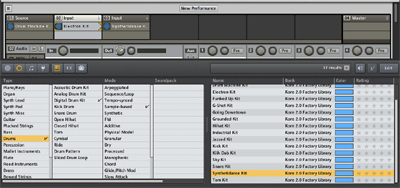 The Edit Area in the middle loads individual plugs (SingleSounds) and can layer multiple Plug-ins and library presets to create a MultiSound. The idea here is to create layers from all the different plug-in presets on your computer without opening the individual plug-ins' interface since KORE 2 does this behind the scenes for you. This entire set up is saved as a KoreSound and can be loaded into itself as a SingleSound. If you think of layering the already layered patches you can get some serious creations that might be hard, if not impossible, to visualize all in one take. This simply means a sessions worth of routing and chaining and layering can be brought up in another session as a singular sound without ever having to dive back in under the hood. On the very bottom is the Info Pane. It displays the same information a mouse over would. It's needed for the many pages of options and extensive context-sensitive functionality.
PowerKore (Do and do and a don't)
The KORE Controller grants control of the most tweaked settings on any patch you pull up. It's all about the performance parameters here. No longer do you need to scan that horrible GUI looking for the filters. It's already mapped out to the Controller for any Plug-in that follows a standard automatable parameters spec. It's impossible to have a set up ready for some of the more complicated modular plug-ins, but you can MIDI learn and customize your KORE Controller.
There are no direct sounds coming from the KORE controller. I know it looks crazy but no, no sounds. What you do get is a 5 gig library of Native Instrument worthy sounds, including more than two dozen mixed drum kits and seventy-five bass patches. It's tons of content, but obviously it's easy to manage. You will take advantage of 30 different FX, ranging from the expected to the bizarre and can easily spend hours trying out a single sound patch with different FX patches- before even getting to the FX settings.
The newest crop of software is quite powerful with huge gig-chewing libraries and you will need to keep up with the ever-increasing demands. Understand; the KORE controller is not a DSP solution: you need a real rig to run the next generation of software and a robust soundcard with solid drivers. On my default install and set up (M-audio ASIO on a 2.4GHZ Intel with 3 Gigs of RAM) I was getting slight crackles on the larger patches (pianos and some soundscapes) so I worked at 11ms of latency which made them stop, but they returned when polyphony was upped from heavy patching and chord play.
They suggest: Mac OSX 10.4.x / 10.5, G5 1.8 GHz or Intel Core Duo 1.66 GHz, 1 GB RAM and Win XP / Vista (32 Bit), Pentium / Athlon 1.4 GHz, 1 GB RAM. These system requirements are pretty light, but let's be honest- you don't get a system as powerful as this and drive it in the right lane. All problems ceased when I switched to Firewire ASIO from a MOTU 896HD. This is one more offering that makes an upgrade for an audio-geared soundcard so much more sensible.
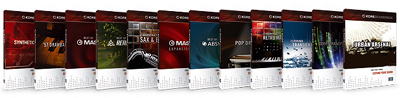 Visit the NI site for the KORE Expansion packs
If you have a particular sound category you want to blow out, then consider the KORE soundpacks (~$59.00). Synthetic, pop and acoustic drums, Drawbar Organ, Absynth, Massive, Kontakt and Reaktor sounds are all available for download at the NI shop with more on the way. The KORE 2 integrates the sound engines of REAKTOR, MASSIVE, ABSYNTH, FM8, KONTAKT and GUITAR RIG which allows it to play the patches from their heaviest product lines. If you have licensed versions, the original GUI can be pulled up and edited as normal or left hidden while you get to work - fully focused on tone and composition.
At the Core of KORE
In summary, Native Instruments have put together an incredible hybrid ROMpler and synthesizer, patch browser and sound design tool with an FX suite and engine incorporating the technologies of their entire line of products. The final and most important question you might ask about KORE 2 is what will it do for my production? That answer is easy enough. It will give you choices. It will allow you sound as different or as modern as you want to or, better yet, choose to. And since there is the free KORE Player which gives you access to the interface and browser with 300MBs of sounds, you'd be silly not to fully explore the KORE 2 package from Native Instruments. It's really a simple choice.
Native Instruments - Main web portal
Product Forum - Tech support and user community
KORE Line - KORE specific product info from NI site

Copyright © 2006, Producers Edge Magazine. All rights reserved.
Reproduction in whole or in part without permission is prohibited.
Site design by AVX Productions.